This is the live version. For the agent version, stay till the end.
David Arnoux
Build your full GTM engine in Grokbot (live build)
live, so something will break
Sit back. No need to build along.
At the end you get one link. Paste it into your Grokbot. It asks a few questions about your business and sets up the same engine for you, looot included.
questions at the end
I’m David.
I build GTM engines.
my three hats
1
An AI community
GenAI Circle
AI applied to GTM, personal productivity and company rollout.
thegenaicircle.com
2
GTM OS method
heyarnoux.
I help build and implement GTM engines.
A team of engineers I can deploy on projects.
heyarnoux.com
3
A venture studio
looot
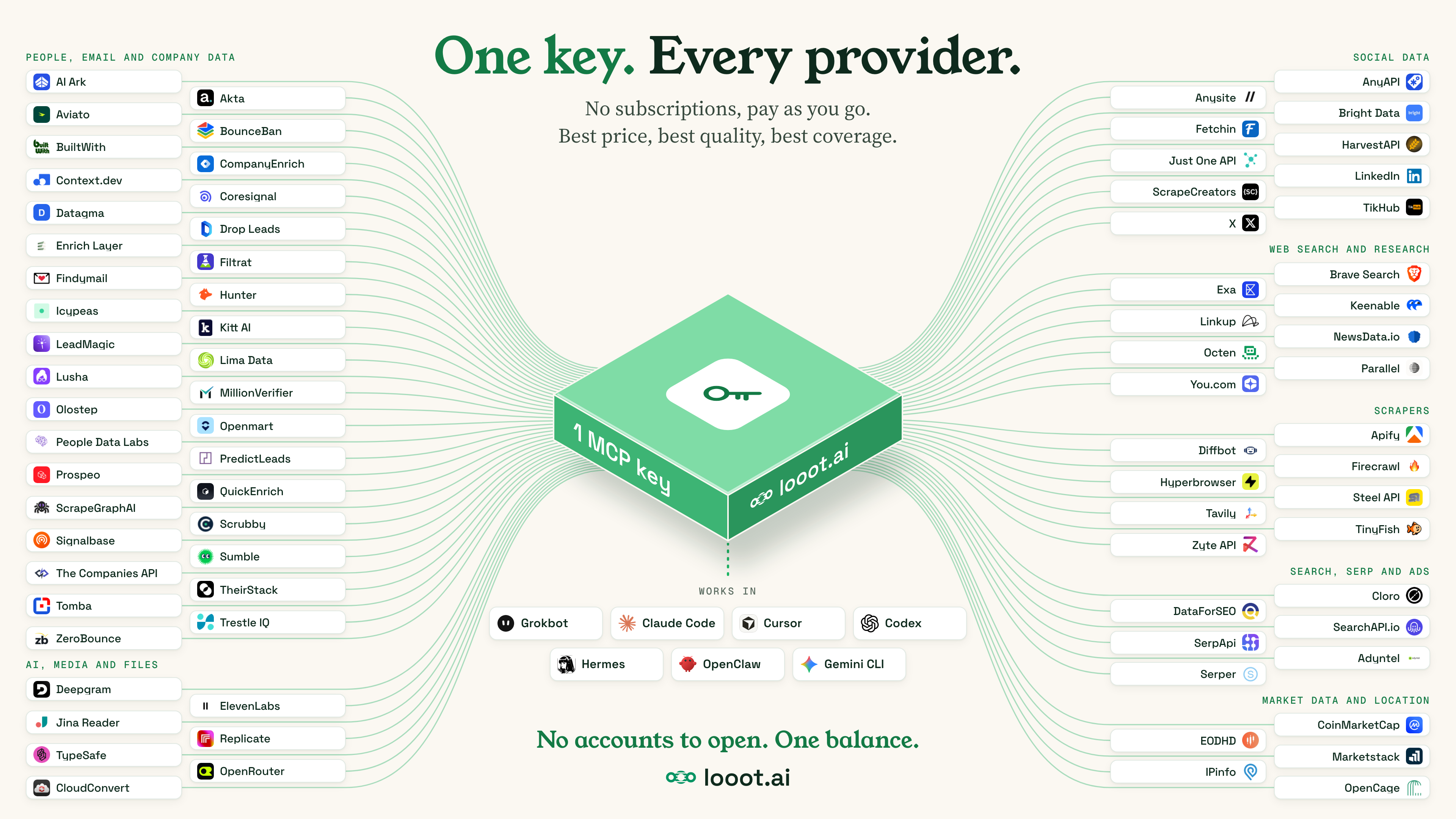
One key for all the data.
looot.ai
ViralBrainviralbrain.ai
worked with these lovely people
What the stack built
Plug them in. You get a city.
news
buyers
ad billboards
activity
sources
search
GTM OS
Figure 1.1
Four stages of a GTM team.
Pink marks who decides. The decider moves from people to the system and people keep the edge cases. At stage four every result loops back in, so the system learns. At stage one the decider is usually whoever replied all last.
Mark the stage each of your ten decisions sits in today.
14GTM OS by David Arnoux
most of the market
the hard jump
the system acts first
Grokbot, a V1
if you set it up right
15
Want the full book? Leave your email at heyarnoux.com/thegtmosOpen the GTM OS page
The honest version
Grokbot
Premium or higher on The X Subscription, from $30 a month.
What it is
Always on Bots
One cloud computer
Its own memory per Bot
Your laptop can be closed. It keeps working.
What it isn’t
Self hosted
Your choice of model
A wall between Bots
No model picker. Bots share files and browser sign‑ins.
Good at
Scheduled routines
Sites with no API
Phone and X Chat
Use MCP for data. It beats clicking around.
Bad at
Building code
Showing its work
Predictable cost
Every routine run burns usage, even when it finds nothing.
watch the meter
the bot was here
Larger organisations
Grokbot suits founders and small teams.
Larger organisations and enterprises need more control than it gives today.
1
One shared computer
Bots share files and browser logins.
2
Hard to audit
Limited audit view on personal plans. Enterprise plans add audit logs.
3
One usage pool
Every routine run burns usage from one weekly pool.
Bigger companies
Enterprise setups get a bit more complicated.
Engines you build
outbound, scoring, content, reports
Orchestration
what runs, in what order
Ontology
what a lead is, who owns it
Source of truth
CRM, warehouse, finance
Data sources coming in
product, web, enrichment, email
Governance
Access control
Roles and permissions
Single sign on
Row level security
Secrets vault
Audit log
Data residency
PII masking
Data retention
Consent and opt out
Rules
Approval before send
Spend caps
Rate limits
Evals
Prompt versions
Model allowlist
Prompt injection guard
Humans in the loop
Rollback
the loop teaches it back
for enterprise, it gets heavier
For a bigger company I recommend you get in touch.
heyarnoux.com
We design it for you. We’ll design it together.
Before the demo
My personal setup. The simple version in Grokbot.
My personal stack
Runs on
HetznerTailscaleCoolify
Models
Opus 5.5GPT 6.1open models
Data
looot25 MCP servers
Memory
GitHub repoLLM wikiObsidian
Agents
Claude CodeCodexCommand Code
Checks
Codex reviewhuman gatesLangfuse
Outputs
deckspagesposts
The stack I build live
looot through MCP
one line, pasted once
Your rules
pasted in once
GTM map
from a short interview
Five skills
account scan and four more
Routines
on a schedule
0 of 5 built
You talk to it on your phone, in X Chat or on desktop.
I’ll show you this live.
The GTM 2x2
What you do with all this power.
Motions you can run. Today I automate the table stakes that should run in the background.
built today
Live demo
Let’s jump into Grokbot.
Setup 1 of 2
about 2 min
Sign in and check your plan.
Grokbot and the Grok chat app are two different apps. A paywall in the Grok app tells you nothing about Grokbot. You know it works when your Bot answers you.
1
Check your plan
Premium or higher on The X Subscription, from $30 a month. Legacy paid Cursor plans count too.
2
Install the app
Desktop from cursor.com/dashboard/bot, on Mac, Windows or Linux. Or the phone app.
3
Sign in
With the Cursor account that holds the access. Keep the app open while the browser finishes.
4
Meet your Bot
You run GTM
for <company>.
Then set your time zone.
this one trips people
Setup 2 of 2
about 5 min
Plug in looot.
looot is the data. Inspect shows each price first. Your balance is the ceiling for the whole account. Public data and a test domain today. Company accounts only once your admin has approved Grokbot and looot.
Give this to your agent
$ set up looot - https://looot.ai/skill.md
1
Paste it into Grokbot
One line. Your Bot reads the skill and sets looot up.
$2 free
2
Sign in
In the browser. Pick your workspace.
free
3
Free check
What’s my looot balance?
$2 free, enough to test the setup
If it breaks
Most blocks clear in a minute.
Same list for my demo and for you when you build yours. The same files work in Claude or ChatGPT.
1
No Grokbot on my plan
Plus and Free don’t include it. Build it in Claude or ChatGPT with the same files.
2
Sign in fails or loops
Use a Cursor account, free at cursor.com. Keep the app open. Private window. Still stuck, wait 30 to 60 minutes.
3
looot won’t connect
Paste the set up line again in a new chat. Sign in at looot.ai first. If your admin blocks it, stop there and ask for approval.
4
insufficient_balance
Your looot balance is empty. Top up at looot.ai, then ask for the balance again.
5
Usage limit hit
Usage resets each week. Prepaid credit or a bigger plan gets you back today.
press F to go back
What you just saw
Five runs from start to finish.
Every run showed the price before my yes. Tick these when you build yours.
Setuplooot connected, rules said back
Get customers100 accounts, a score on each
Organic socialfive formats, a two week plan
The marketa battlecard per rival
Daily rhythma morning brief at 8:00
SEO and GEOrankings, AI answers, page ideas
Optional next
One routine
Add the next one only when the first one earns it.
Read every brief
Look at what it read next to what it found.
Watch two meters
Your weekly usage and your looot balance.
tick, tick, tick
Before you go
Next steps.
The Grokbot GTM pack
Build your own GTM engine
One link for your Grokbot. It asks a few questions and sets it up for your business.
heyarnoux.com/grokbot-gtm
1
looot
Give your agent one key to every data provider. looot.ai/skill.md
With me. Personal one on one. Prep before, two live sessions together, then chat support after. €3,950.
With one of my partners. €2,450.
Contact me on LinkedIn or at david@heyarnoux.com
4
The community
Keep building with us at thegenaicircle.com
phone out, scan
Your questions
Ask me anything.
These came in before today. Drop yours in the chat.
Cost
What does this cost me, really?
Guardrails
Who sets the guardrails?
Why Grok
Why this one over the others?
Prospecting
Can it build my lists?
Templates
Is there one to start from?
Speed
Why does it feel slow sometimes?
drop yours
Appendix. What it remembers
Own your memory.
Start with plain notes your agent can read. Then map your business. Keep it in your own repo so you can swap any supplier tomorrow. Pink is the step most people skip.
1
Raw sources
Calls, emails, posts and enrich results. Nobody edits them.
2
LLM wiki
The model writes the pages, you read them. One call note updates ten pages.
3
Ontology
Companies, people, deals, signals, objections. And how they connect.
4
GitHub repo = Obsidian vault
Same markdown files. Git for the agents, Obsidian for you.
next
5
InfraNodus
Finds the gaps, like objections your content never answers.
Thank you
Go run it.
Build yours with the pack. Set one routine and read every brief.

 GenAI Circle
 looot
 ViralBrainviralbrain.ai